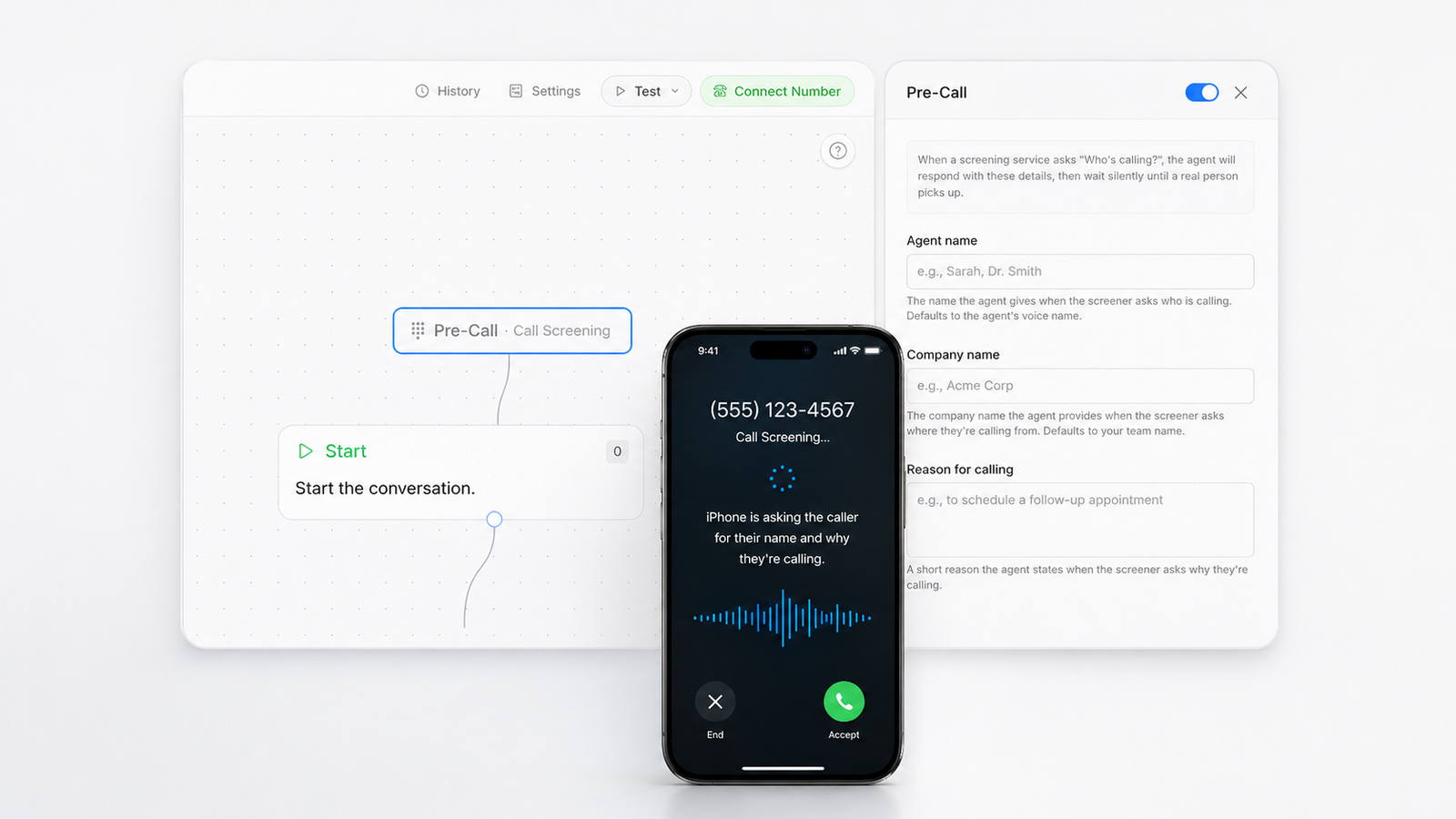
Call Screening Assist: help AI agents respond to phone screening
Thoughtly agents can respond to iOS call screening, Android Call Screen, Google Pixel Call Assist, Gemini-adjacent phone workflows, Samsung Bixby Text Call, Truecaller, Hiya, and other automated screens with the right identity and reason for calling.
Last updated
Thoughtly now supports call screening assistCall Screening AssistCall Screening Assist helps a Thoughtly voice agent respond when a mobile screening service asks who is calling and why.Read full definition → for AI voiceAI voiceAn AI voice is synthetic speech produced by a text-to-speech model, using a selected or cloned voice to speak an agent's generated or scripted response.Read full definition → agents: a way for agents to respond when a call-screening system asks who is calling, what company they represent, or why they are calling.
The useful version of this is not another disconnected feature for a single channel. It is a way to keep customer intent moving from the first signal into the next qualified step, with the agent carrying context across calls, messages, email, CRM updatesCRM updatesCRM updates are changes written after or during a conversation, such as status, notes, owner, next step, appointment, or disposition.Read full definition →, and operational handoffs.
This matters because most revenue workflows do not fail in one dramatic moment. They leak in the small transitions: the missed call after a form fill, the reminder nobody sends, the CRMCRMA CRM is the system used to manage leads, contacts, accounts, opportunities, activity, ownership, and follow-up.Read full definition → note that arrives too late, the handoff where the human teammate starts with no context, or the compliance rule that lives outside the tool doing the outreach. Call screening assist is one piece of making that whole path feel less brittle.
The problem call screening assist actually solves
Call screening assist helps an AI agent handle the automated prompt that sometimes appears before a recipient answers. Instead of stalling at the screen, the agent can provide approved caller identity and a short reason for the call.
This is designed for legitimate follow-up: appointment requests, inbound lead responses, customer callbacks, and other conversations where the recipient has a reason to recognize the business.
Outbound teams are running into more screening prompts before a real person ever hears the call. That creates a new failure point between a lead's request and the team trying to respond.
For speed-to-lead programs, every avoidable drop matters. If an AI agent can answer the screen clearly and truthfully, more calls have a chance to continue into the actual workflowWorkflowA workflow is a defined sequence of steps, decisions, actions, delays, and outcomes used to complete a business process.Read full definition →.
Apple's iPhone call-screening controls have made this more important for any team that relies on legitimate outbound follow-up. In Apple's current Phone settings, unsaved numbers can be handled three ways: calls can ring normally, the iPhone can ask the caller for a reason before the phone rings, or the call can be silenced and sent to voicemail. That means an AI voice agentVoice agentA voice agent is a conversational software system that listens, responds, follows a defined workflow, and can take approved actions during a phone conversation.Read full definition → may be speaking to the recipient's iPhone before it ever reaches the recipient.
This is the iOS call screening moment revenue teams need to design for. Apple also documents that a recipient can ask a caller for more information without answering, and the caller's reply appears on the iPhone as text. For a sales, admissions, healthcare, home services, insurance, mortgage, or appointment-setting team, the first sentence now has to answer the device-level question clearly: who is calling, from what business, and why this call is expected.
Live Voicemail adds another nearby pattern. Apple says Live Voicemail can show a real-time transcriptionSpeech-to-Text (STT)Speech-to-Text (STT) converts spoken audio into text that a voice agent can interpret, store as a transcript, and use in downstream actions.Read full definition → while someone is leaving a message, and unknown callers can go directly there when Silence Unknown Callers is enabled. Even when that is not the same flow as iOS call screening, the buyer behavior is similar: people increasingly decide from a transcriptTranscriptA transcript is the written record generated from a spoken conversation, typically showing what the caller and agent said during a call.Read full definition →, not from the sound of a ringing phone.
Across iOS call screening, iPhone call screening, Screen Unknown Callers, Ask Reason for Calling, Silence Unknown Callers, and Live Voicemail, the buyer expectation is shifting in the same direction. Unknown callers are being filtered before the conversation. AI agents that cannot state identity and call purpose cleanly will lose more legitimate follow-up opportunities before qualification, booking, routing, or CRM updates ever begin.
Thoughtly's call screening assist is built for that environment. It should not be used to disguise spam or force unwanted calls through. It should be used to make approved outreach legible to modern call-screening systems: a clear business name, a plain-language reason for calling, and a workflow that continues only when the recipient chooses to engage.
Google's Call Screen help is useful context because Pixel-style screening helped normalize a new behavior: the caller may need to identify themself and explain the reason for the call before a human ever answers.
How it works inside Thoughtly
The implementation details live in Thoughtly call screening assist docs, which is the better place to check exact setup fields, supported behavior, and edge cases. The product principle is simple: call screening assist should make the agent more useful without hiding the controls operators need before they trust it in production.
In practice, the workflow is straightforward, but the operational impact comes from keeping the steps connected. Configure the agent name, company name, and customer-facing reason for calling. When a screening prompt asks for identity or purpose, the agent responds with those approved details. After the screen completes, the agent continues the normal call flow. Teams should write the reason-for-calling phrase in plain language the recipient will recognize. It does not guarantee every carrierCarrierA carrier is a telecommunications provider that transports voice calls or messages between phone numbers and networks.Read full definition →, app, or device will connect every call.
The important detail is that the agent is not acting as a loose script generator. It is operating inside the same Thoughtly environment where teams configure routing, outcomes, variables, integrations, testing, and post-conversation automation. That means the feature can support a real process instead of creating another artifact that someone has to manually translate into work.
For operators, this is the difference between a clever demo and a durable workflow. A demo can show that an AI agent can say the right sentence once. A production workflow has to keep doing the right thing when the contact answers late, chooses another channel, asks a question out of order, needs a human, or triggers a downstream update.
What changes for GTM and operations teams
The clearest use cases are practical rather than futuristic. Following up with a form fill while the lead still remembers the request. Calling customers about scheduled appointments, quotes, or applications. Reducing dropped calls caused by automated screens during legitimate outreach. These are the moments where an agent earns its keep: not by sounding impressive in isolation, but by reducing the distance between a customer's intent and the team's next useful action.
The FCC call authentication overview is useful background on STIR/SHAKENSTIR/SHAKENSTIR/SHAKEN is a caller ID authentication framework that lets telephone networks verify information about a call’s originating number.Read full definition → and caller identity. It does not replace call screening, but it explains why outbound trust now depends on a stack of signals: number reputation, business identity, truthful call purpose, and what the recipient's device chooses to do with an unknown caller.
This is also where Thoughtly’s positioning matters. The goal is not to replace every human conversation or turn every workflow into cold outbound. The goal is to convert the leads and customers companies already have by following up quickly, collecting the right information, updating the right systems, and escalating when a human should take over.
That lens changes the writing, the setup, and the success criteria. You do not measure the feature only by whether it technically fired. You look at whether the customer got a timely response, whether the sales or service team received usable context, whether consent and suppression rules were respected, and whether the workflow created momentum instead of noise.
How to roll it out without creating noise
The implementation details live in Thoughtly branded callingBranded callingBranded calling displays verified business identity, and sometimes a logo or call reason, on supported devices when a business calls.Read full definition → docs, which is the better place to check exact setup fields, supported behavior, and edge cases. The product principle is simple: call screening assist should make the agent more useful without hiding the controls operators need before they trust it in production.
Start with one high-intent workflow where the business outcome is already clear. A new form-fill callback, a missed-call recoveryMissed-call recoveryMissed-call recovery reconnects with a caller who reached the business but did not connect with the intended person or team.Read full definition → path, a booked-appointment reminder, a quote-request follow-up, or a transfer-heavy qualification flow is usually easier to evaluate than a broad, all-purpose assistant. The narrower the first workflow, the easier it is to write crisp prompts, test realistic conversations, and decide what should happen next.
Before expanding, review the places where the agent touches the outside world: phone numbers, message templates, email domains, webhooks, CRM fields, transfer destinations, suppression rules, and analytics. Those details are not glamorous, but they are where trust is either built or lost. A richer agent experience depends on the boring plumbing being correct.
Call screening assist is available in Thoughtly for teams using the relevant channel, workflow, or integration configuration. Talk to the Thoughtly team if you want help enabling it for your account.
Android, Google Gemini, Samsung, and third-party call screening
Android call screening is not one uniform product. On Google Pixel phones, Call Screen can answer an unknown call, ask who is calling and why, and show a live transcript before the recipient decides whether to pick up. Phone by Google also describes automatic screening for unknown callers on Pixel devices, which means the first audience for a legitimate outbound call may be Google's call assistant rather than the buyer.
Google's broader phone AI direction matters too. Pixel Call Assist groups call-screening and call-management features together, while Google's Pixel materials describe Gemini Nano creating private summaries for Call Notes after participants are notified. That is not the same thing as call screening assist, but it shows where Android phone UX is going: AI intermediates are increasingly involved before, during, and after voice calls.
Samsung has its own version of the same buyer behavior. Bixby Text Call can answer calls with Bixby's automated voice and convert the exchange into a text interaction for the phone owner. For a legitimate AI-agent call, the implication is the same as iOS and Pixel: identify the business, explain the reason for the call, and use wording that makes sense when read as a transcript.
Third-party and carrier-layer tools add more variation. Truecaller Assistant screens calls on Android and iOS, and Hiya AI Phone positions itself around intelligent call screening, scam protection, synthetic voice detection, and automated call summaries. Add carrier products such as spam labels, branded calling, call blocking, and number reputation, and the real-world path from dial to conversation becomes a chain of filters rather than a simple phone ring.
That is why Thoughtly should be evaluated against the whole call-screening ecosystem, not just one Apple setting. iOS call screening, Android Call Screen, Google Pixel Call Assist, Gemini-powered phone features, Samsung Bixby Text Call, Truecaller, Hiya, carrier spam labels, and branded calling all point in the same direction: outbound teams need calls that are recognizable, consent-aware, and easy for a device or human to understand in one sentence.
A good call-screening assist setup should not try to trick Apple, Google, Samsung, Truecaller, Hiya, carriers, or the person being called. It should make legitimate outreach machine-readable and human-readable: company name, call purpose, consent context, and the next step the recipient expects.
iOS call screening FAQ
What is iOS call screening?
iOS call screening is Apple's way of helping iPhone users manage unknown callers before they answer. Depending on the user's settings, unsaved callers may be asked to explain why they are calling, silenced to voicemail, filtered into an unknown callers list, or allowed to ring normally.
How does iPhone call screening affect AI voice agents?
It moves the first conversion moment earlier. The AI agent may need to satisfy a device prompt before the buyer hears the call. That makes caller identity, brand name, consent context, and reason-for-calling language part of the agent design — not an afterthought.
Is call screening assist the same as spam evasion?
No. The credible use case is legitimate follow-up where the business has a reason to call: a form fill, appointment, quote requestQuote requestA quote request is an inbound inquiry asking for pricing, coverage, or a cost estimate for a product or service.Read full definition →, application, missed call, or customer callback. If the call is unwanted or non-compliant, the answer is not better consent and call handling; it is better consent, suppression, targeting, and channel strategy.
Can call screening assist guarantee that iOS will ring the recipient?
No. Apple, carriers, spam filters, user settings, number reputation, region, roaming status, and recipient behavior can all affect what happens. The goal is not a guarantee. The goal is to make legitimate AI-agent outreach clearer when a screening system asks who is calling and why.
The bottom line
Call screening assist is a practical reliability upgrade for teams that use AI agents to respond to real customer intent. It is not spam evasion; it is clear identification before the conversation starts.
The bigger story is that AI agents are becoming less like standalone call scripts and more like coordinated revenue operations workers. Call screening assist helps push Thoughtly further in that direction: closer to the real handoffs, channel constraints, compliance boundaries, and follow-up loops that decide whether demand turns into pipeline, appointments, or resolved customer work.
If you're building AI agents to convert inbound demand, qualify leads, or automate customer conversations, book a demo with Thoughtly.